See Users’ File Activities Using Activity Dashboard
G Suite makes it easier for users to collaborate. An important part of collaboration is deciding how and when to follow up. Now improve your collaboration in Google Docs, Sheets, Slides with Activity Dashboard.




Activity Dashboard helps users to see file activity in G suite. This is not meant for auditing purpose. Through Activity Dashboard, file-viewing information will appear to the users. Using this information, file editors can follow up with other collaborators more efficiently. To view the Activity dashboard for a file, users must have Edit permission to the file (It will not appear for the users who are having View or Comment access). Activity Dashboard is for intradomain only.
Administrator’s Part: G Suite administrator can control if users can see each other's file activity on an Activity dashboard. File activity includes the names of users who have viewed the Google files and the time they viewed them.
To check organisation’s file viewing settings:
Go to Admin console ( admin.google.com ) -> From Home Page, go to Apps -> G Suite -> Drive and Docs -> Activity dashboard settings
From this page, Admin can select an option for who can see a user’s file views

User’s Part: Users can control whether their file viewing information is displayed in the Activity dashboard.
Even if an admin turns a user’s view history on, user can still choose privacy settings to hide their file views from the dashboard.
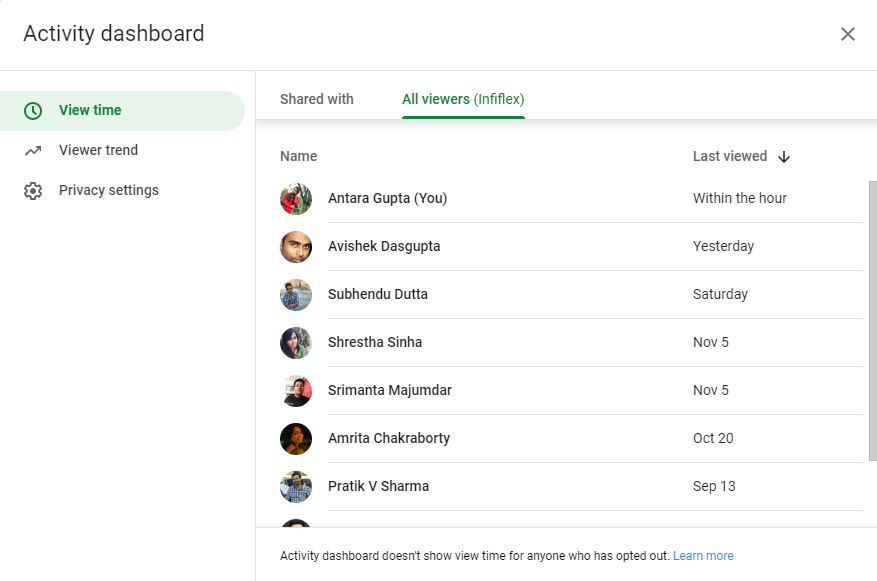


Activity dashboard is a feature that lets users with edit access see who has viewed the file and when they viewed it.